Setting Up a Google Business Profile for Home Businesses
Last reviewed October 27, 2026. A home-based business may qualify for a Google Business Profile if it serves customers in person. If you travel to customers and do not serve them at home, set up a service-area business and hide your residential address. An online-only business generally does not qualify.
This guide explains how to claim or create a profile, choose service areas, verify the business and improve the information customers see. Start with Google’s business representation guidelines.
Set Up as a Service-Area Business
Choose the setup that reflects how you serve customers. A plumber who travels to homes but does not receive customers at their own address can use a service-area profile and hide the address. A business that also serves customers at a genuine staffed location may qualify as a hybrid business.
- Search Google Maps for your business first. If a profile exists, claim it or request ownership instead of creating a duplicate.
- If no profile exists, start at Google Business Profile, enter your real business name and choose the most accurate category.
- Follow the prompts for your location and service area. If customers do not visit your address, hide it from the public profile.
- Complete the verification method Google offers, then review your hours, contact information, services and website.
Google can change its interface and verification options, so follow the current prompts rather than relying on an old screenshot.
Define Your Service Areas Properly
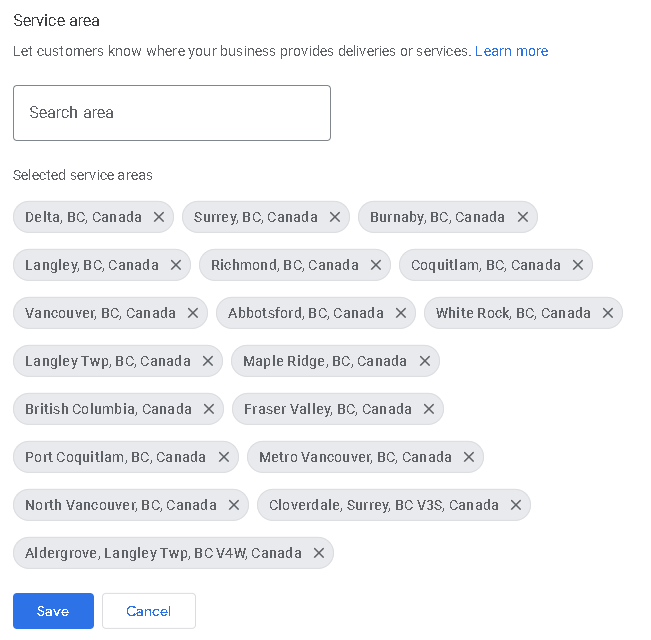
Choose cities, postal codes or other supported named areas that you actually serve. Google allows up to 20 service areas; you cannot define a service area as a radius. Google says the overall area generally should not extend much more than about two hours’ driving time from your base.
For example, a Surrey-based plumber might add Surrey and nearby communities where they routinely accept jobs, rather than listing every municipality in the region. The named area tells customers where you work; it does not guarantee rankings throughout that area. See Google’s service-area guidance.
Handle the Address Requirement During Setup
Enter accurate location details when Google requests them for verification, and set the public address visibility to match how you serve customers. For a service-area business that does not serve customers at its address, Google instructs you to remove the address from the public profile.
Google decides which verification method is available. If it requests a video, follow its instructions to show evidence of the location, the work and your authority to represent the business. Do not assume everyone must show the same vehicle, key or signage. See verification instructions and video guidance.
Improve local visibility without displaying your home address
Choose a specific primary category, describe the services you actually provide, and keep your hours, telephone number and website accurate. Add genuine photographs of your team or completed work where appropriate, and make it easy for customers to understand your service area.
Build useful service pages for the locations you genuinely cover, with specific details about your work rather than duplicated city-name pages. Request honest reviews without incentives or conditions, and reply professionally. Google considers relevance, distance and prominence when showing local results; no service-area setting guarantees a map ranking. See Google’s local ranking guidance.
When can a home address be shown?
A public address is appropriate only when the business meets Google’s requirements for a customer-facing location. Google’s guidelines address permanent signage, staffing and customer-facing hours; a sign alone does not make a virtual office or an online-only business eligible. Check the current guidelines before showing a residential address.
What This Actually Means for Your Business
A useful profile gives customers a clear way to contact you and an accurate description of what you do. After verification, check your categories, services, hours, website link and service areas whenever your business changes. Track calls, website visits and enquiries over time alongside the quality of the leads you receive.
For help with your profile and related service pages, explore Oi Marketing’s local SEO services or contact our team.